> ## Documentation Index
> Fetch the complete documentation index at: https://r2r-patch-fix-ingestion.mintlify.site/llms.txt
> Use this file to discover all available pages before exploring further.
# Developer Quickstart
> Getting started with SciPhi Cloud
This guide shows developers how to:
1. Ingest files into your SciPhi Cloud
2. Search over the ingested files
3. Request or stream a RAG (Retrieval-Augmented Generation) response
4. Use the RAG Agent for more complex, interactive queries
Be sure to complete the [deployment instructions](/sciphi-cloud/deploy) before continuing with this guide. If you would prefer to start interacting with your deployment from the cloud, then [refer here](/sciphi-cloud/projects).
### Installing the R2R CLI &/or SDK
PyPi is currently the primary supported method for installing the R2R client. Similarly, the javascript client can be installed through npm, though this does not yet include a CLI.
```bash
pip install r2r
```
```bash
npm install r2r-js
```
We are actively working on building more lightweight CLI options. Refer to the dedicated documentation sections for further information about the currently available options:
The remainder of this quickstart will proceed with CLI commands, but all of these commands are easily reproduced inside of the Javascript or Python SDK.
### Set your environment variable
Start by clicking the copy icon next to your deployed pipeline URL (`https://sciphi-9ab60cab-0ff5-4cea-9d41-80f6d7607c3e-qwpin2swwa-ue.a.run.app` in the image below) and then exporting this into your local environment variable:
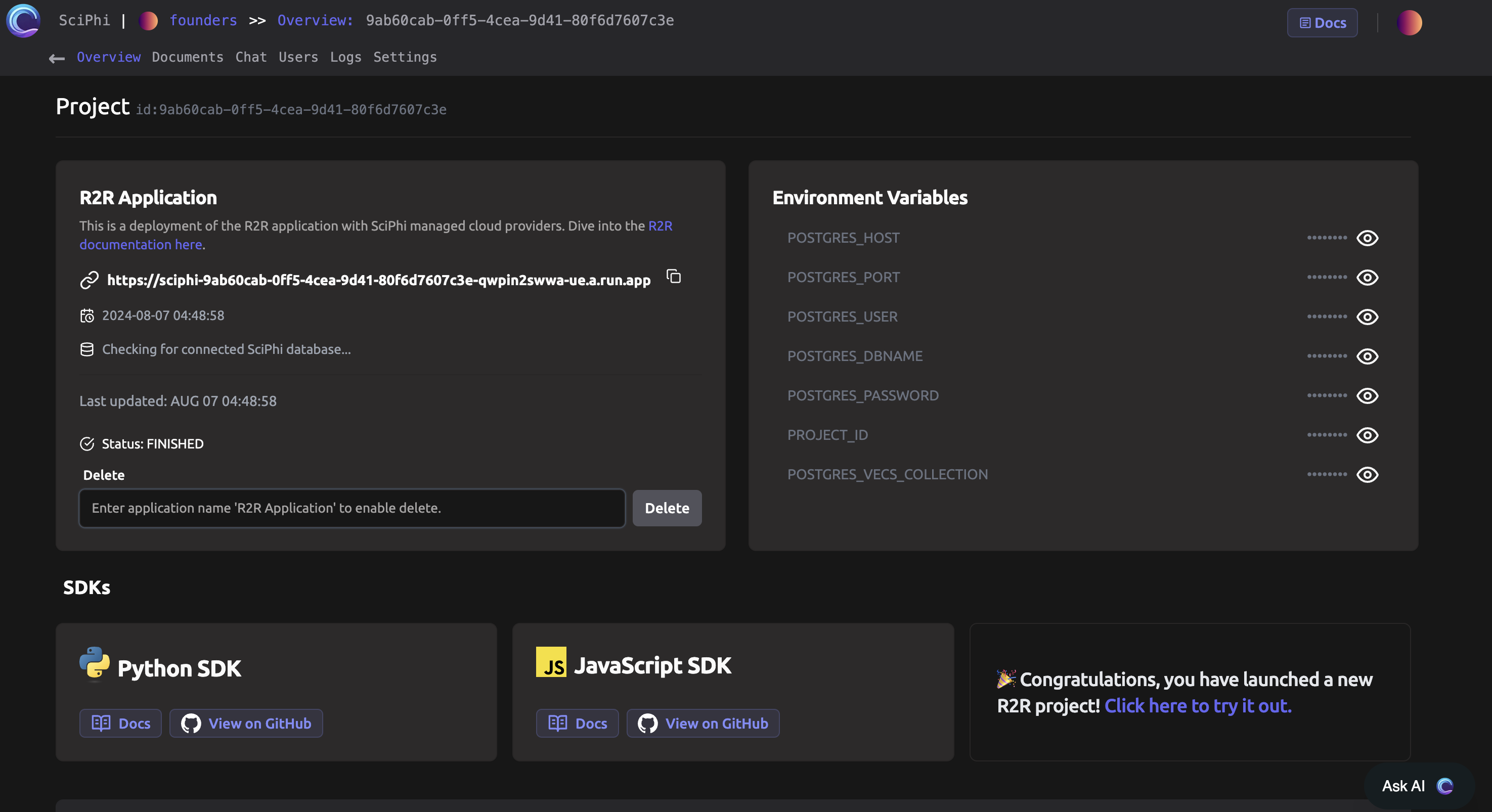 ```bash
export SCIPHI_CLOUD_URL=https://sciphi-7c961437-...YOUR_PIPELINE...-ue.a.run.app
```
Next, check that you are able to communicate with the deployment from your command line:
```bash
curl $SCIPHI_CLOUD_URL/v2/health
# {"results":{"response":"ok"}}
```
### Ingesting file(s)
The following command ingests a default sample file `r2r/examples/data/aristotle.txt`:
```bash
r2r --base-url=$SCIPHI_CLOUD_URL ingest-sample-file
```
To ingest your own files, replace the file path with your desired file or directory:
```bash
r2r --base-url=$SCIPHI_CLOUD_URL ingest-files /path/to/my/files
```
### Executing a search
Perform a search query:
```bash
r2r --base-url=$SCIPHI_CLOUD_URL search --query="who was aristotle?" --use-hybrid-search
```
### RAG Response
Generate a RAG response:
```bash
r2r --base-url=$SCIPHI_CLOUD_URL rag --query="who was aristotle?" --use-hybrid-search
```
### Stream a RAG Response
Stream a RAG response:
```bash
r2r --base-url=$SCIPHI_CLOUD_URL rag --query="who was aristotle?" --stream --use-hybrid-search
```
```python
rag_results = client.rag(
query="Who is John?",
vector_search_settings={"use_hybrid_search": True},
rag_generation_config=GenerationConfig(model="openai/gpt-4o-mini", temperature=0.0, stream=True)
)
for chunk in rag_results:
print(chunk, end='', flush=True)
```
```bash
curl -X POST $SCIPHI_CLOUD_URL/v2/rag \
-H "Content-Type: application/json" \
-d '{
"query": "who was aristotle?",
"vector_search_settings": {
"use_vector_search": true,
"search_filters": {},
"search_limit": 10,
"use_hybrid_search": true
},
"kg_search_settings": {
"use_kg_search": false
},
"rag_generation_config": {
"model": "openai/gpt-4o",
"stream": true
}
}' \
--no-buffer
```
### Using the RAG Agent
The RAG Agent provides a more interactive and intelligent way to query your knowledge base. Here's an example of how to use it:
```python
from r2r import R2RClient
client = R2RClient(base_url=os.environ.get("SCIPHI_CLOUD_URL"))
messages = [
{"role": "user", "content": "What was Aristotle's main contribution to philosophy?"},
{"role": "assistant", "content": "Aristotle made numerous significant contributions to philosophy, but one of his main contributions was in the field of logic and reasoning. He developed a system of formal logic, which is considered the first comprehensive system of its kind in Western philosophy. This system, often referred to as Aristotelian logic or term logic, provided a framework for deductive reasoning and laid the groundwork for scientific thinking."},
{"role": "user", "content": "Can you elaborate on how this influenced later thinkers?"}
]
result = client.agent(
messages=messages,
vector_search_settings={"use_hybrid_search":True},
rag_generation_config={"model": "openai/gpt-4o", "temperature": 0.7}
)
print(result['choices'][0]['message']['content'])
```
This example shows how to use the RAG Agent for a multi-turn conversation about Aristotle's contributions to philosophy.
Remember to replace `$SCIPHI_CLOUD_URL` with your actual deployed pipeline URL in all examples.
```bash
export SCIPHI_CLOUD_URL=https://sciphi-7c961437-...YOUR_PIPELINE...-ue.a.run.app
```
Next, check that you are able to communicate with the deployment from your command line:
```bash
curl $SCIPHI_CLOUD_URL/v2/health
# {"results":{"response":"ok"}}
```
### Ingesting file(s)
The following command ingests a default sample file `r2r/examples/data/aristotle.txt`:
```bash
r2r --base-url=$SCIPHI_CLOUD_URL ingest-sample-file
```
To ingest your own files, replace the file path with your desired file or directory:
```bash
r2r --base-url=$SCIPHI_CLOUD_URL ingest-files /path/to/my/files
```
### Executing a search
Perform a search query:
```bash
r2r --base-url=$SCIPHI_CLOUD_URL search --query="who was aristotle?" --use-hybrid-search
```
### RAG Response
Generate a RAG response:
```bash
r2r --base-url=$SCIPHI_CLOUD_URL rag --query="who was aristotle?" --use-hybrid-search
```
### Stream a RAG Response
Stream a RAG response:
```bash
r2r --base-url=$SCIPHI_CLOUD_URL rag --query="who was aristotle?" --stream --use-hybrid-search
```
```python
rag_results = client.rag(
query="Who is John?",
vector_search_settings={"use_hybrid_search": True},
rag_generation_config=GenerationConfig(model="openai/gpt-4o-mini", temperature=0.0, stream=True)
)
for chunk in rag_results:
print(chunk, end='', flush=True)
```
```bash
curl -X POST $SCIPHI_CLOUD_URL/v2/rag \
-H "Content-Type: application/json" \
-d '{
"query": "who was aristotle?",
"vector_search_settings": {
"use_vector_search": true,
"search_filters": {},
"search_limit": 10,
"use_hybrid_search": true
},
"kg_search_settings": {
"use_kg_search": false
},
"rag_generation_config": {
"model": "openai/gpt-4o",
"stream": true
}
}' \
--no-buffer
```
### Using the RAG Agent
The RAG Agent provides a more interactive and intelligent way to query your knowledge base. Here's an example of how to use it:
```python
from r2r import R2RClient
client = R2RClient(base_url=os.environ.get("SCIPHI_CLOUD_URL"))
messages = [
{"role": "user", "content": "What was Aristotle's main contribution to philosophy?"},
{"role": "assistant", "content": "Aristotle made numerous significant contributions to philosophy, but one of his main contributions was in the field of logic and reasoning. He developed a system of formal logic, which is considered the first comprehensive system of its kind in Western philosophy. This system, often referred to as Aristotelian logic or term logic, provided a framework for deductive reasoning and laid the groundwork for scientific thinking."},
{"role": "user", "content": "Can you elaborate on how this influenced later thinkers?"}
]
result = client.agent(
messages=messages,
vector_search_settings={"use_hybrid_search":True},
rag_generation_config={"model": "openai/gpt-4o", "temperature": 0.7}
)
print(result['choices'][0]['message']['content'])
```
This example shows how to use the RAG Agent for a multi-turn conversation about Aristotle's contributions to philosophy.
Remember to replace `$SCIPHI_CLOUD_URL` with your actual deployed pipeline URL in all examples.