> ## Documentation Index
> Fetch the complete documentation index at: https://r2r-patch-fix-ingestion.mintlify.site/llms.txt
> Use this file to discover all available pages before exploring further.
# Deploy
> Deploy your first RAG engine
## Deploy a RAG Pipeline
SciPhi is building the Elasticsearch for RAG by enabling developers to deploy **high-quality, user-ready Retrieval-Augmented Generation (RAG) systems** in just a few clicks. In this guide we will cover how to deploy a vector database and a configurable RAG engine powered by R2R.
### Signup
Start by signing up for a free user account with the [SciPhi Cloud application](https://app.sciphi.ai/).
### Deploy a database
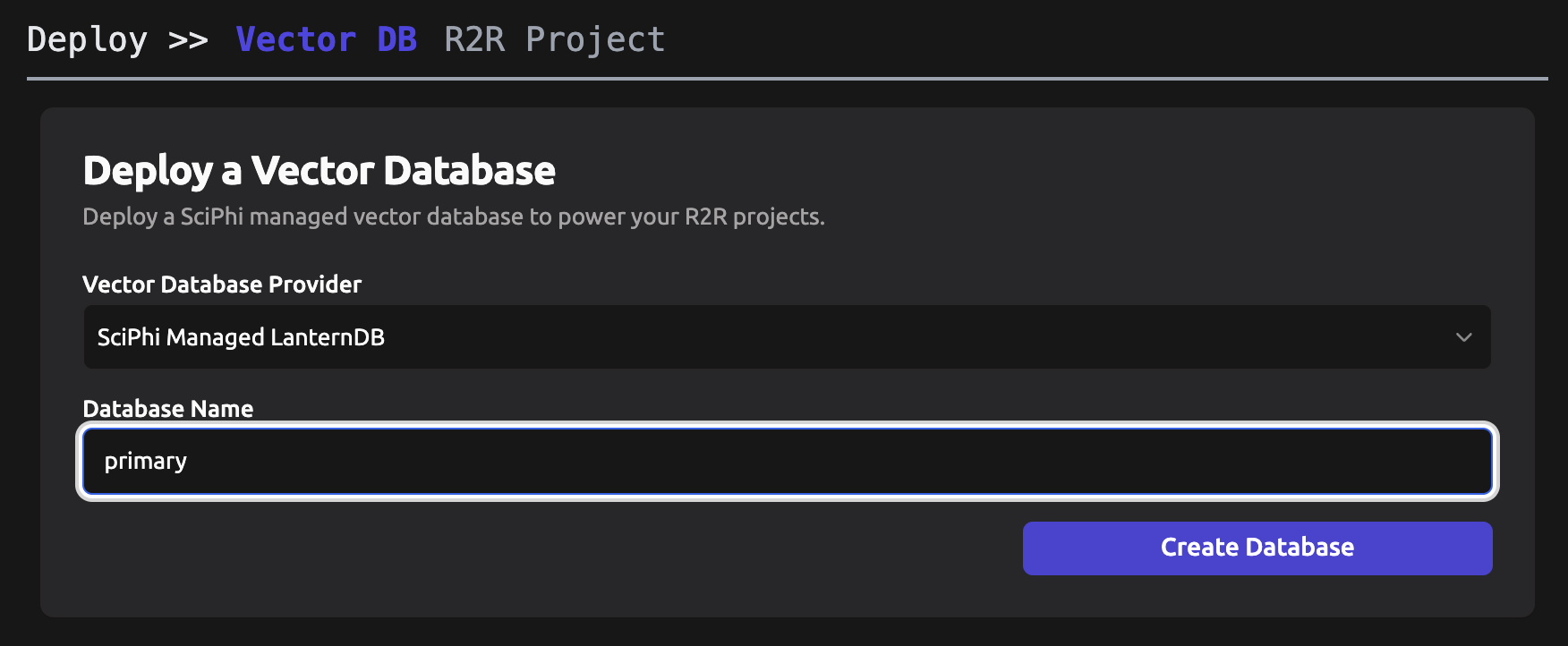
R2R is built around a Postgres database and the pgvector extension. The cloud application requires us to get started by deploying a SciPhi managed vector database instance. [Click here to go straight to the deployment page](https://app.sciphi.ai/deploy).
### Deploying a project
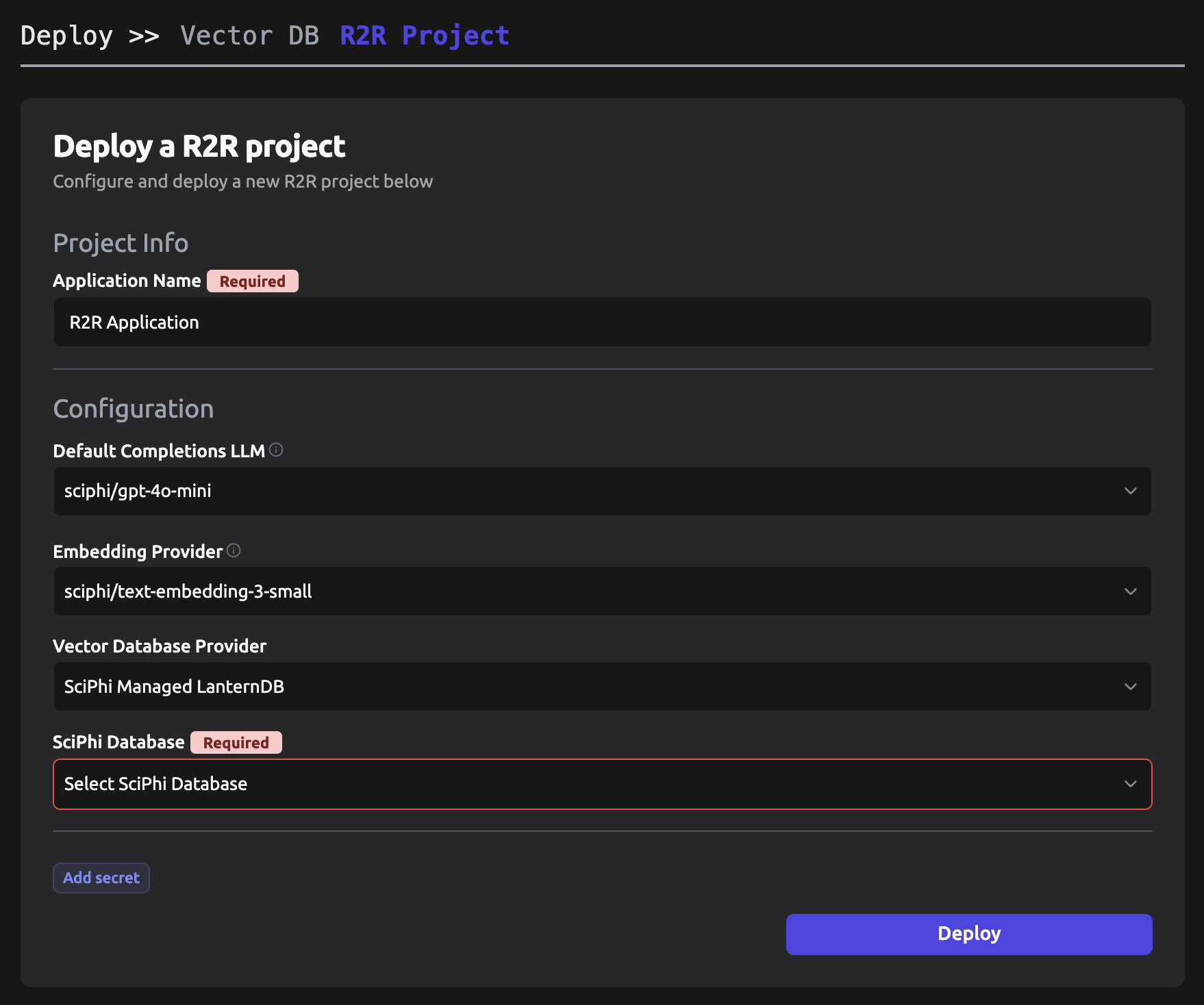
Next, click `R2R Project`. After successful deployment of your Postgres database you should see a page like that pictured below:
Select your newly deployed database from the dropdown and then click `Deploy`. SciPhi will then provision the necessary infrastructure to power your R2R application. Free completions with `gpt-4o-mini` are provided as part of the SciPhi Free Tier. If you would like to use alternative cloud providers for LLM completions and/or embeddings then you may make the appropriate selections on this page as well.
### Providing Secrets
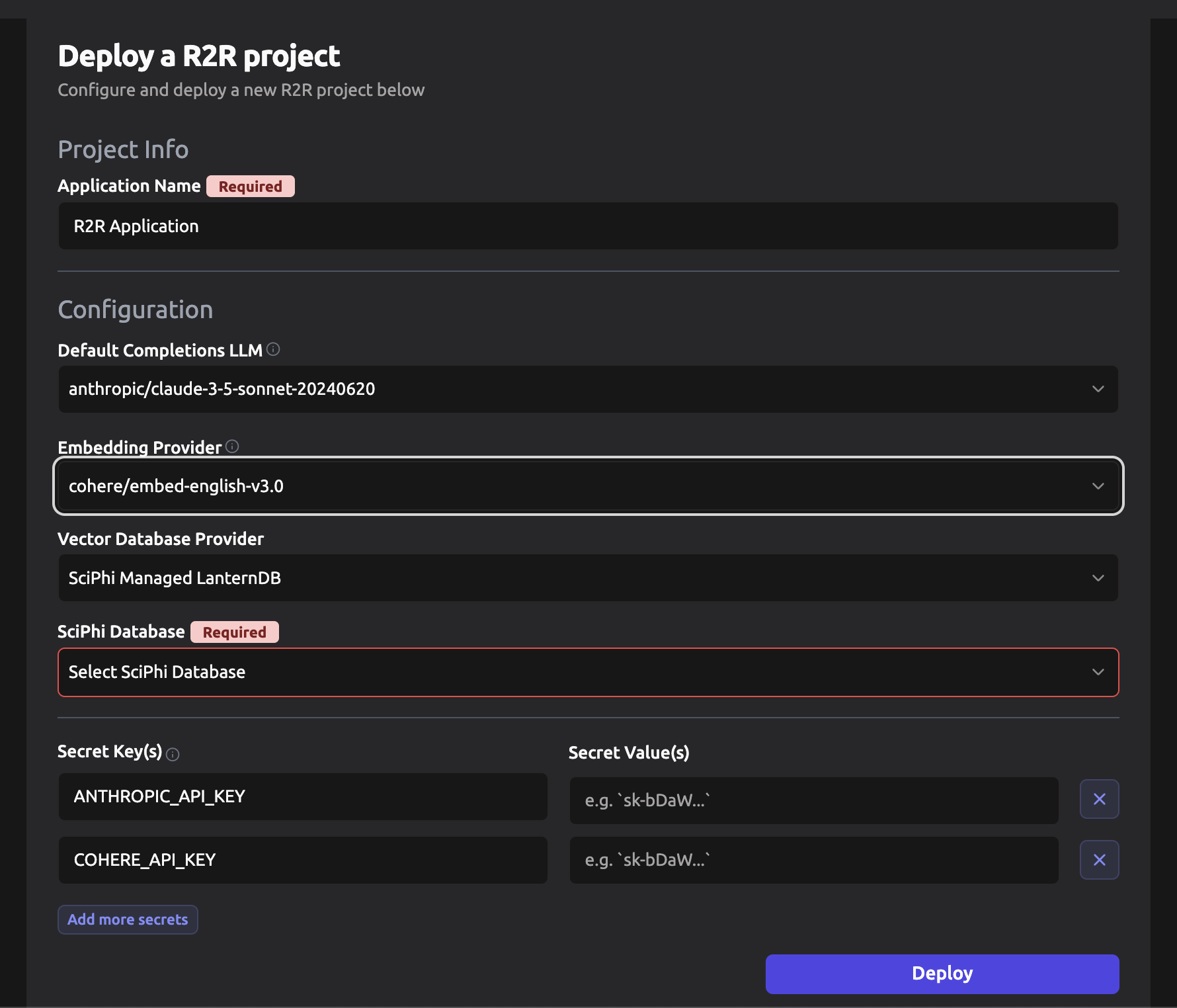
During deployment you must provide any necessary secret variables, such as API keys, for external cloud providers. By default such secrets are not necessary and are only required when deploying with non-default options, as pictured below.
Your secrets are encrypted at all times during transmission and storage. Our infrastructure is hosted on Google Cloud and our secrets are provisioned through Google Cloud's Secret Manager. You can read more about SciPhi's [security policy here](/sciphi-cloud/security).
### Project Application
Once you've provided the required secrets, click the "Deploy" button to create your RAG pipeline. SciPhi will handle the deployment process, setting up the necessary infrastructure and services based on your configuration.
Upon successful deployment of an R2R application, you will be provided with a unique URL (e.g., [https://sciphi-b30ed103-25eb-4428-a2b2-ff71c2e1ae85-qwpin2swwa-ue.a.run.app](https://sciphi-b30ed103-25eb-4428-a2b2-ff71c2e1ae85-qwpin2swwa-ue.a.run.app)) that serves as the endpoint for accessing and interacting with your deployed R2R project using the R2R client.
### Step-by-step Video
 ### Deploying a project
Next, click `R2R Project`. After successful deployment of your Postgres database you should see a page like that pictured below:
### Deploying a project
Next, click `R2R Project`. After successful deployment of your Postgres database you should see a page like that pictured below:
 Select your newly deployed database from the dropdown and then click `Deploy`. SciPhi will then provision the necessary infrastructure to power your R2R application. Free completions with `gpt-4o-mini` are provided as part of the SciPhi Free Tier. If you would like to use alternative cloud providers for LLM completions and/or embeddings then you may make the appropriate selections on this page as well.
### Providing Secrets
During deployment you must provide any necessary secret variables, such as API keys, for external cloud providers. By default such secrets are not necessary and are only required when deploying with non-default options, as pictured below.
Select your newly deployed database from the dropdown and then click `Deploy`. SciPhi will then provision the necessary infrastructure to power your R2R application. Free completions with `gpt-4o-mini` are provided as part of the SciPhi Free Tier. If you would like to use alternative cloud providers for LLM completions and/or embeddings then you may make the appropriate selections on this page as well.
### Providing Secrets
During deployment you must provide any necessary secret variables, such as API keys, for external cloud providers. By default such secrets are not necessary and are only required when deploying with non-default options, as pictured below.
 Your secrets are encrypted at all times during transmission and storage. Our infrastructure is hosted on Google Cloud and our secrets are provisioned through Google Cloud's Secret Manager. You can read more about SciPhi's [security policy here](/sciphi-cloud/security).
### Project Application
Once you've provided the required secrets, click the "Deploy" button to create your RAG pipeline. SciPhi will handle the deployment process, setting up the necessary infrastructure and services based on your configuration.
Upon successful deployment of an R2R application, you will be provided with a unique URL (e.g., [https://sciphi-b30ed103-25eb-4428-a2b2-ff71c2e1ae85-qwpin2swwa-ue.a.run.app](https://sciphi-b30ed103-25eb-4428-a2b2-ff71c2e1ae85-qwpin2swwa-ue.a.run.app)) that serves as the endpoint for accessing and interacting with your deployed R2R project using the R2R client.
### Step-by-step Video
Your secrets are encrypted at all times during transmission and storage. Our infrastructure is hosted on Google Cloud and our secrets are provisioned through Google Cloud's Secret Manager. You can read more about SciPhi's [security policy here](/sciphi-cloud/security).
### Project Application
Once you've provided the required secrets, click the "Deploy" button to create your RAG pipeline. SciPhi will handle the deployment process, setting up the necessary infrastructure and services based on your configuration.
Upon successful deployment of an R2R application, you will be provided with a unique URL (e.g., [https://sciphi-b30ed103-25eb-4428-a2b2-ff71c2e1ae85-qwpin2swwa-ue.a.run.app](https://sciphi-b30ed103-25eb-4428-a2b2-ff71c2e1ae85-qwpin2swwa-ue.a.run.app)) that serves as the endpoint for accessing and interacting with your deployed R2R project using the R2R client.
### Step-by-step Video